An independent laboratory
for musical invention

Make the improbable playable.

We make imaginative tools for exploring, understanding and making music.

Our first instrument is Grimoire.

Explore Grimoire

In private testing. Not yet released.

I. II. FIG. 01 INSTRUMENT, OVERPRINTED
Plate I · IllustrationNot measured data
Grimoire · Instrument 01

Your instruments have secrets.

A working library grows one purchase at a time. Kontakt keeps its own browser, SINE keeps another, Spitfire and VSL have their own players, the Audio Units sit somewhere else entirely. None of them knows anything about the others.

So you reach for the same forty patches — not because they are the best you own, but because they are the ones you can find. The rest is paid for and effectively invisible. Grimoire reads all of it, shows you the orchestra you actually have, and turns a MIDI cue into a session that plays it.

III. FIG. 03 · DISCOVERY
Plate III · IllustrationNot measured data
  1. 01 · FIND

    Every library, one catalog

    Kontakt, SINE, Spitfire, Synchron and Audio Units, searched together instead of one browser at a time.

  2. 02 · SEAT

    The orchestra you own

    Each library placed in the sections it can play, with an honest note on how well Grimoire knows it.

  3. 03 · BUILD

    A cue becomes a session

    Import, review, build: a Cubase project that plays your libraries, with the delays measured for each patch.

Your orchestra

It starts by finding out what you own.

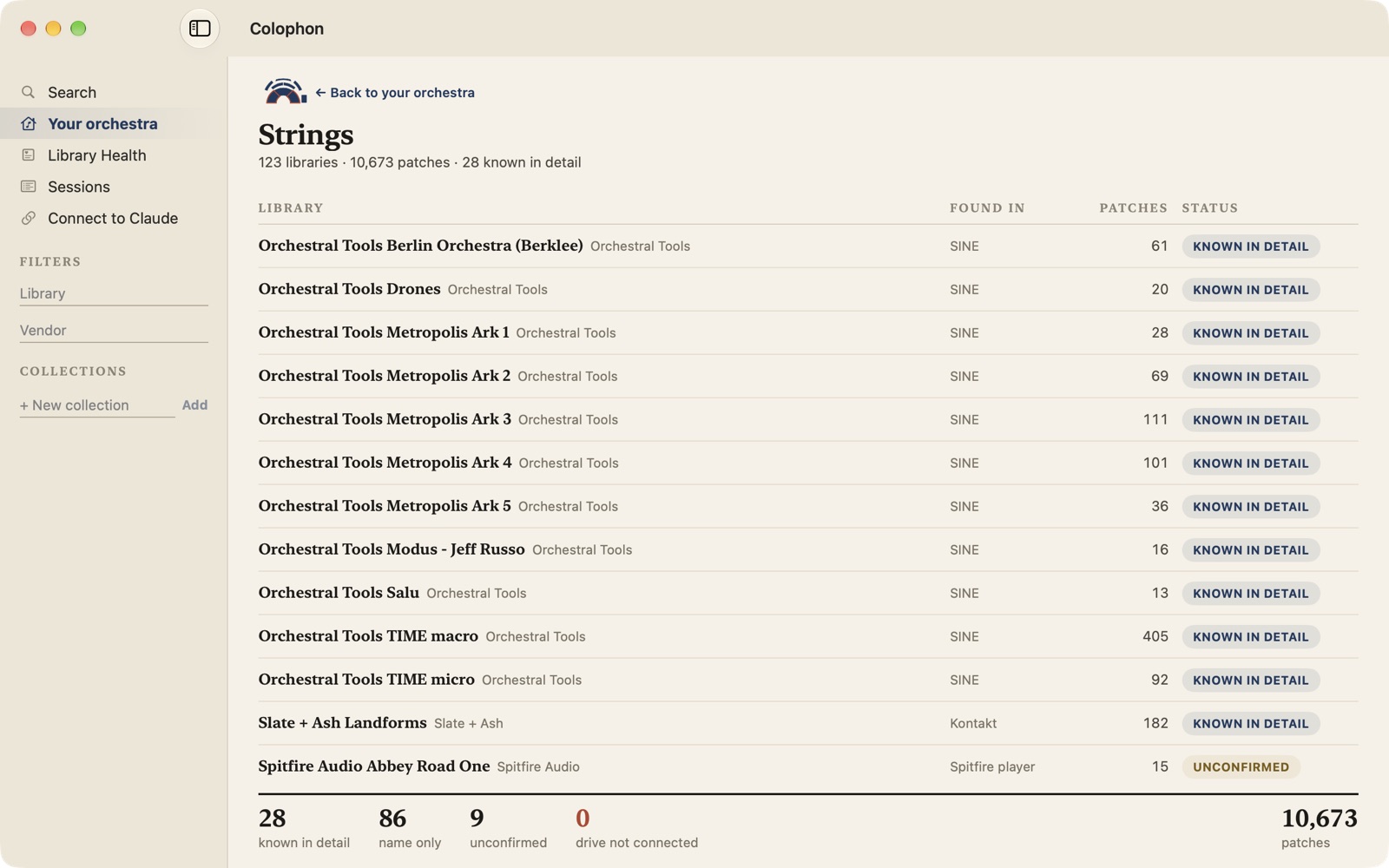
On first launch Grimoire scans Kontakt, SINE, the Spitfire player, VSL’s Synchron player and your Audio Units, and seats every library in the sections it can play. Click a section and you get its ledger: every library, where it was found, how many patches, and how well Grimoire knows it.

That last column matters, because from then on Grimoire only picks patches you own. It says plainly how sure it is:

Known in detail
Articulations, key ranges and how it loads are all known. The best kind of pick.
Name only
Found on your disk, matched by patch name. It will load, but no articulation switching or measured delay.
Unconfirmed
Grimoire can’t check that you have it yet. A track that uses it might load empty, and Review says so.
Drive not connected
Your sample drive is unplugged. Nothing is forgotten; the picks come back when the drive does.
Your orchestra 199 libraries
STRINGS123 libraries WOODWINDS73 libraries BRASS · 54 PERCUSSION · 54 CHOIR · 42 KEYS · 73 OTHER112 libraries CONDUCTOR
One real machine’s scan. Each library lands in the sections it can play.
The app's Strings ledger: 123 libraries and 10,673 patches. Rows list libraries such as Orchestral Tools Berlin Orchestra, the Metropolis Ark series, TIME macro and micro, and Slate + Ash Landforms as known in detail, and Spitfire Audio Abbey Road One as unconfirmed. A footer tallies 28 known in detail, 86 name only, 9 unconfirmed and 0 drive not connected.
The app todayThe Strings ledger on the same machine, in the current build, before its redesign. Spitfire’s own player can’t be checked yet, so its libraries show as unconfirmed rather than pretending.
Sessions

Drop in a cue. Get back a session that plays.

  1. Drop a MIDI file

    A sketch, a mock-up or a finished cue. Grimoire reads each track’s name to work out what the line is: second violins, a horn section, a piano.

  2. It casts every line from your orchestra

    Each track gets a patch you own and an articulation state, with the delay that was measured for that exact patch. When the best fit is a library you don’t have, Review names it, so you know what you’re trading away.

  3. You review and swap

    Every pick is a row you can change. Swap a patch, leave a track out, and save the result as a session file you can come back to. Tracks it couldn’t place are flagged, never silently dropped.

  4. It builds the session

    A Cubase 15 project you open like any other, or a Track Archive to import. With Vienna Ensemble Pro, it creates the instances, loads every preset — Kontakt patches included, unattended — and routes Cubase’s tracks to them. Anything it couldn’t place arrives as a named, empty track waiting for your choice. Replacing a project always keeps the old one.

With Claude

Ask for it in words. Hear the alternative in place.

Grimoire ships with an MCP server inside the app, and a Connect to Claude panel that sets it up for Claude Desktop or Claude Code in one step. Everything above becomes something you can ask for: “find me a warm solo cello that isn’t too slow”, “build this cue for VE Pro, grouped by section”.

It also reaches into a Cubase project you already have open. Claude can list its tracks, then put a B version of any instrument track beside the original: the same parts and automation, played by a different library through VE Pro, muted. One call flips between A and B, so you can audition a re-orchestration without rebuilding anything. The original track is never touched.

The server runs no language model and sends nothing off your machine; search uses Apple’s on-device word embeddings. Tools that change something outside Grimoire — a project file, a running VE Pro, the Cubase window — say so, and a well-behaved client asks you before it calls them.

Field Notes

Experiments, written down as they happen.

Field Notes is where Incantone documents what the instruments actually do: the apparatus, the method, what was observed and what broke. Nothing here is published yet. The first entry is planned.

Experiment 001Planned · not yet published

Two orchestras, one composition

What happens when the same cue is played by two different sets of libraries, one call apart? Grimoire can now build a muted B version of any instrument track in an open Cubase project. This entry will write down how, what it costs, and where it fails.

Apparatus
Cubase, Vienna Ensemble Pro, and Grimoire’s MCP tools.
Method
cubase_build_variant exports a track, rewrites it to host a different patch in VE Pro, imports it as <title> [B] and mutes it. The original is never changed and the project is never saved.
Measured so far
About twenty seconds a track in live testing, while the machine is left alone.
To report
Observations, limits and anything that doesn’t reproduce.
A B FIG. A/B
Plate II · IllustrationNot measured data
Limits

What it does not do yet.

  • Cubase only, and macOS only. Sessions are built for Cubase 15; the live tools also work with projects saved by older versions. No Logic, Pro Tools or Reaper yet.
  • It doesn’t measure delays itself. A separate harness plays every patch and measures when it really speaks. Without those measurements a session still builds, just without the nudges.
  • Some players can’t be checked. Spitfire’s player and VSL’s Synchron libraries show as unconfirmed until Grimoire can read what they hold.
  • The live tools borrow your mouse and keyboard. Loading Kontakt patches and building B tracks drive real windows. Leave the machine alone while they run — about twenty seconds a track.
Status

No one is using this yet.

Grimoire is not released. There is no public download; signed test builds go to a few people by hand.

It runs every day against one real library. That library is the only one it has been proven against, and these are its numbers, not a user count:

31,115Patches 199Libraries 34Vendors